
The UP DigiShakti Portal is a powerful online platform created by the Government of Uttar Pradesh to help students receive free tablets and smartphones for educational use. This system lets students complete e-KYC, check eligibility, view status, and track distribution of their devices, all from one place. The portal simplifies every step so students can focus on learning and improving their future careers.
Important Notice: For your safety, use only the official website (https://digishakti.up.gov.in/) when submitting or checking your details. Never share your Aadhaar number, enrollment ID, or any personal information on unauthorised or suspicious websites, as they may be fraudulent.
What is the DigiShakti Portal?
The Digishakti portal is a government-run digital system designed to help students in Uttar Pradesh access modern education tools. It allows educational institutions to upload student data, and then students can verify their identity and track whether they will receive a tablet or smartphone.
Instead of filling out paper forms or visiting offices, everything is managed online through this portal. This saves time and helps students from every part of the state access digital learning opportunities.
Why DigiShakti UP Is Important for Students?
Digital access is now a key part of education. Students study online classes, watch tutorial videos, submit assignments, read e-books, and prepare for competitive exams — all through electronic devices.
The portal helps to:
- Reduce the digital divide among students
- Provide tools for online learning
- Help with exam and career preparation
- Encourage digital literacy in young learners
- Make the education process modern and connected
By offering free tablets and smartphones to students, the government ensures that no deserving student is left behind due to a lack of technology.
Benefits of DigiShakti Portal
- Provides free tablets and smartphones to eligible students, helping them continue their studies without financial burden
- Improves access to online education, such as classes, study materials, and exams, from anywhere
- Enhances digital skills by teaching students how to use the internet, apps, and online platforms effectively
- Reduces the digital divide by supporting students from rural and economically weaker backgrounds
- Offers a transparent system to check eligibility, registration, and device distribution status
- Shares important educational updates, government schemes, and notifications in one place
- Supports career growth by giving access to online courses, skill development resources, and exam preparation tools
Eligibility for the DigiShakti Portal
Not all students are eligible for tablet distribution. In general, students must meet these conditions:
- Must be enrolled in a recognised college or university in UP
- Aadhaar details must be accurate and linked with a current mobile number
- The institution must upload the student’s records to the portal
Additional eligibility rules may vary slightly based on course, academic year, or type of institution. Always confirm with your college.
How To Access the Digishakti Portal Student Login?
Follow the procedure below to access the portal for student authentication and device distribution:
To perform the Digishakti Portal login:
- Visit the official portal at: https://digishakti.up.gov.in/
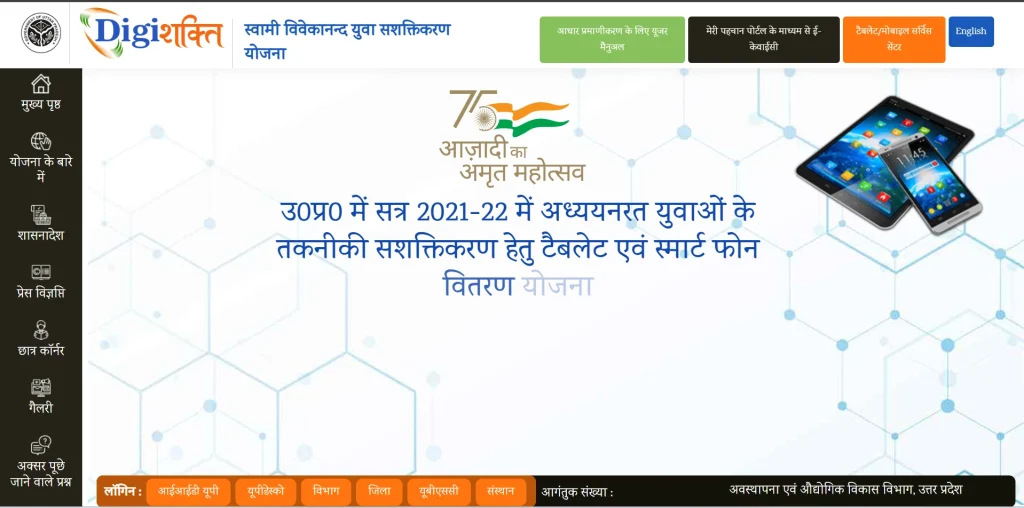
- On the homepage, click the “e-KYC through MeriPehchaan Portal” option.
- Choose your University/Board/Society/Council and College/Institution from the dropdown lists.
- Enter your Enrollment Number and the displayed Captcha Code.
- Click on the “Search” button to continue.
Important Instructions:
- Use only the official DigiShakti website
- Keep your enrollment number ready
- Ensure Aadhaar details are correct and aligned with academic records
- Keep your Aadhaar-linked mobile number accessible for OTP verification
After login, you can check your current verification status, see if your eKYC is complete, and find out when the next steps, like device distribution, will happen.
Understanding DigiShakti EKYC Online
One of the most important steps in the entire process is Digishakti eKYC, a digital identity verification step that confirms your identity using your Aadhaar card.
What is eKYC?
eKYC stands for Electronic Know Your Customer. It is a secure process that confirms a student’s identity using Aadhaar details and an OTP (One Time Password). This verifies that the person claiming the benefit is a real student and eligible for the device.
Why eKYC Is Required
- To ensure the student is real
- To link Aadhaar details with the student’s academic records
- To avoid fraud or duplicate registrations
- To make the distribution systematic and fair
No tablet or smartphone is given to students until they complete the eKYC online process.
Step-by-Step: How to Complete DigiShakti Portal eKYC Online?
Completing eKYC on the portal is straightforward if you follow these steps carefully:
Step 1: Go to the Official Portal
Open the official web portal (the government site). It’s important to only use the official address so your personal information stays safe.
Step 2: Select Your Institution
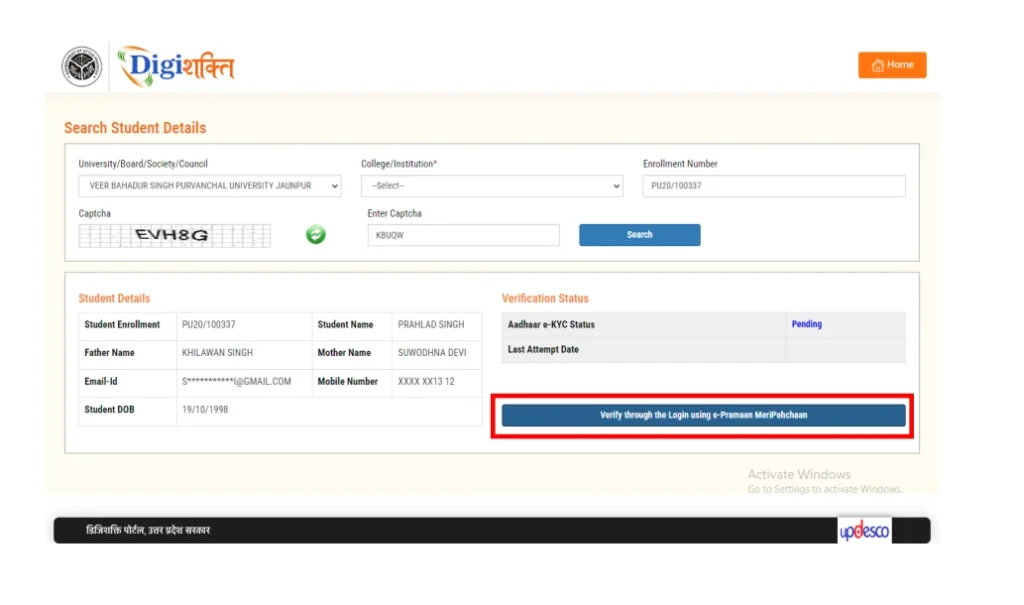
From the dropdown menus, select your University/Board/Society/Council and then your College/Institution, and your correct enrollment number and fill in the captcha code shown on the screen.

Step 3: Check Your Current Status
After clicking Search, your basic details will appear. If your eKYC shows Pending, you can proceed.
Step 4: Click the e-KYC Verification Button
Look for the option to verify through MeriPehchaan eKYC. You will be redirected to the MeriPehchaan system, which handles secure Aadhaar verification.
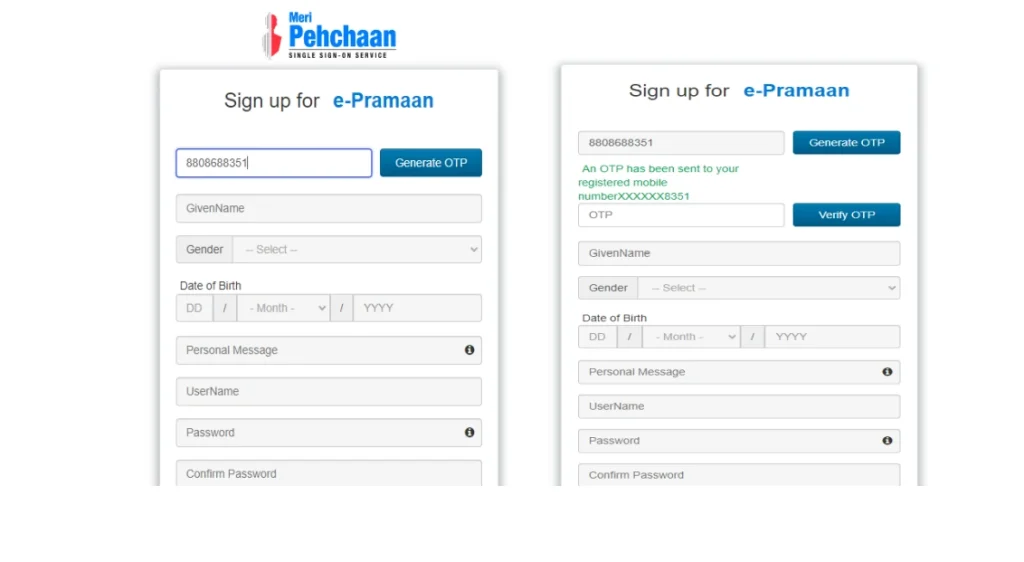
Step 5: New Member Sign-Up (For first-time users only)
Enter the mobile number linked with your Aadhaar and authenticate the OTP that you receive.
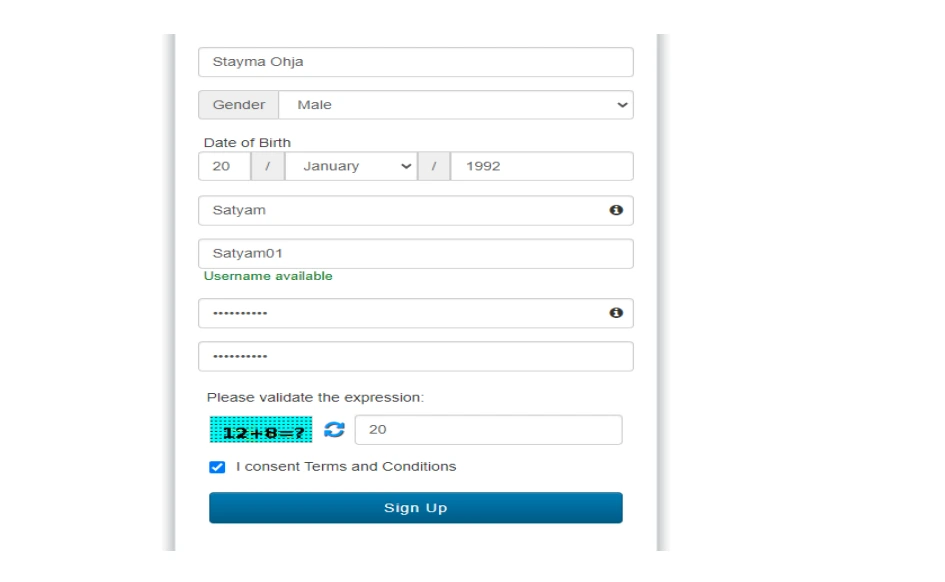
- Complete Name (as per Aadhaar card)
- DOB (as printed on Aadhaar)
- Gender (as mentioned on Aadhaar)
- Generate Username & Password
- Then, Agree to the Terms and Conditions
Step 6: Aadhaar e-Verification Process
Confirm your Digishakti portal Aadhaar e-KYC authentication:
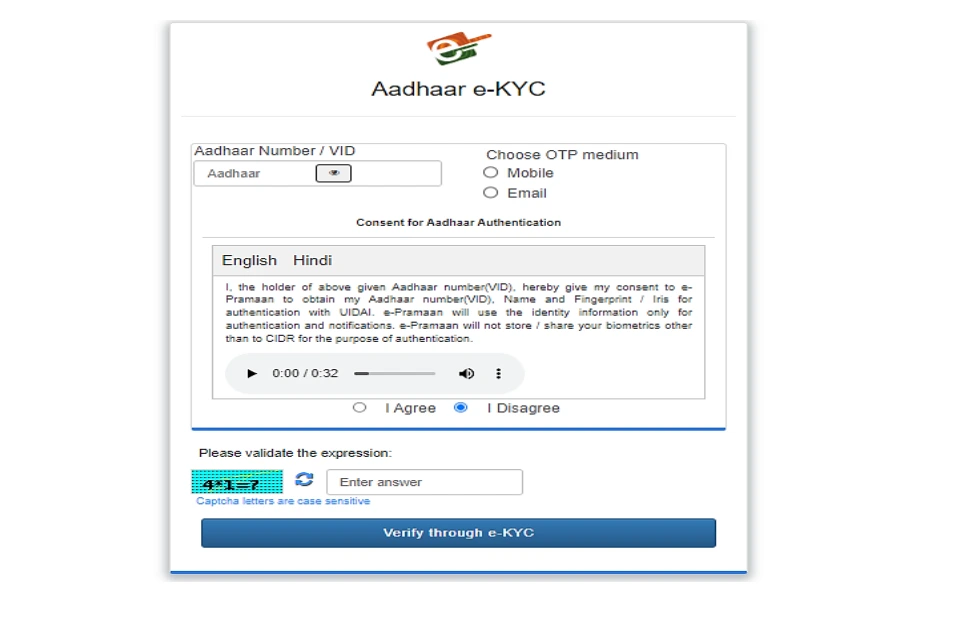
- Fill in your Aadhaar number
- Select OTP option – Mobile or Email
- Select “Verify through eKYC” to proceed
- Enter the OTP sent to your registered mobile/email
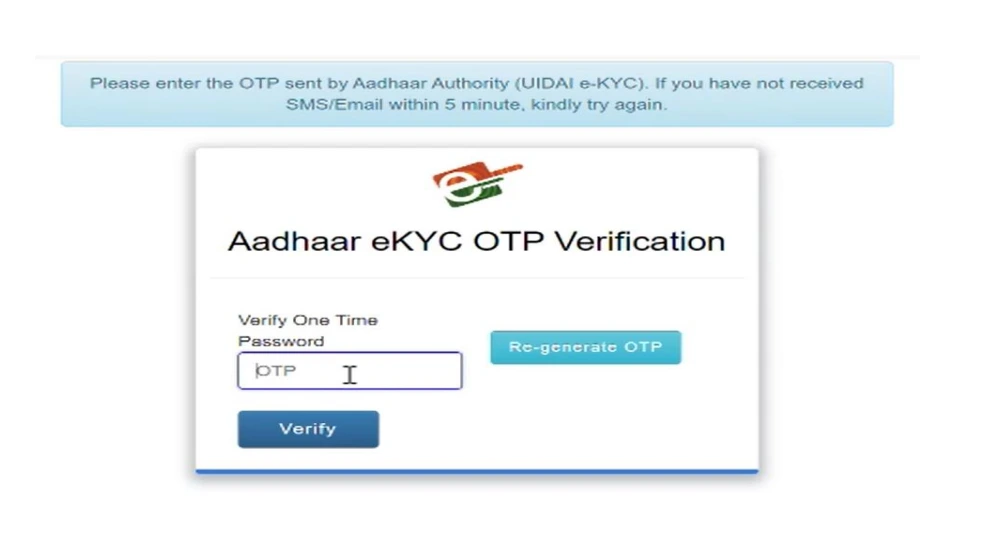
Step 7: Submit and Complete eKYC
Once your details are confirmed and the OTP is accepted, you will see a success message. Your eKYC status will be updated on the portal.

Important Notice: This entire process usually completes within a few minutes. However, your verification might take additional time to be fully approved by your institution or department.
Documents Required for eKYC and Login
To complete the process, you should prepare the following:
- Aadhaar card (with correct name, date of birth, gender)
- Enrollment number from your college
- Mobile number linked with Aadhaar (for OTP verification)
- Your institution details (university and college name)
Keep these ready before starting the eKYC or login process so that you do not face delays.
DigiShakti Portal Application & e-KYC Status Check
Students can check their application and Aadhaar e-KYC status by following the instructions below:
1. Visit the Official Portal
Go to the official website of the portal: {https://digishakti.up.gov.in/}
2. Provide Required Details
To check your record from the Digishakti portal student list and application database, provide the following details:
- Select your University/Board/Society/Council
- Choose your College/Institution
- Enter your Enrollment Number
- Fill in the displayed Captcha Code
Click on “Search” to continue.
3. Application Status Types
After submitting your details, your current status will be displayed:
- Pending – e-KYC verification has not yet been completed.
- Verified – Your Aadhaar e-KYC verification is successful.
- Failed – A mismatch exists between your institutional data and Aadhaar records.
- Under Process – Your data is awaiting Department Lock approval.
4. If Your Status is “Failed”
- Contact your Institution’s Nodal Officer to correct incorrect details on the portal.
- If necessary, update your Aadhaar information to match your academic records.
5. After Making Corrections
Your application will be reprocessed through:
- Institutional verification
- University approval
- Department locking
Once completed, you will be able to perform Aadhaar e-KYC verification again.
DigiShakti Tablet/Smartphone Distribution List
The portal also provides a tablet and smartphone distribution list where students can see if their names are listed for device delivery.
Here is how to check:
- Visit the official portal
- Go to the section for Distribution List
- Enter your institution name, district, or enrollment number to filter the list
- If your name appears, you are eligible for the tablet or smartphone distribution
After you see your name in the list, your college or authority will notify you about where and when to collect your device.
What Happens After eKYC and Approval?
Once your Digishakti KYC online process is complete and verified by all levels (institution, university, department), your name will be marked Verified on the portal.
After that:
- Your school/college will inform you about the distribution schedule.
- On the given date, you will need to bring your ID and enrollment records.
- Devices are typically handed out at the institution’s campus or another designated location.
Each student will receive only one device and must collect it in person.
DigiShakti Portal for Tablet & Smartphone Distribution Benefits
This initiative focuses on more than just giving out devices. It aims to create a stronger digital learning environment for students in UP.
Core Benefits
- Free access to technology for online learning
- Improved exam preparation with study apps
- Better access to educational videos and resources
- Support for digital skills and job preparation
- Reduced the digital divide between rural and urban areas
Students who receive their tablets or smartphones can attend remote classes, complete assignments, and develop computer skills that help in modern careers.
DigiShakti App: Accessing Updates Easily
In addition to the web portal, there is an app available through official app stores that allows students to:
- Get notifications about status updates
- Access educational resources quickly
- View portal updates
- Track distribution schedules
However, core tasks like eKYC and status checking must still be done through the official web portal. Always download the app only from trusted sources.
Safety Guidelines for Students
You should always be careful while using any online portal:
- Use only the official DigiShakti portal web address for verification.
- Never share OTPs or Aadhaar details with anyone else.
- Do not trust fake websites that ask for personal data.
- Contact your college’s nodal officer if you face any issues.
Keeping your information safe will ensure a smooth verification process.
How to Use the Digishakti Portal Tablet Wisely?
Once you receive your device, using it effectively can make a big difference:
- Use educational apps for learning
- Attend online classes
- Watch tutorial videos
- Practice competitive exam questions
- Learn new skills like coding or language tools
A tablet is a tool — and when used wisely, it can help you prepare for future opportunities like jobs, certificates, or higher studies.
Tips for Students Who Are New to the Portal
If this is your first time using an online government portal:
- Don’t worry if you don’t understand every step at first.
- Ask a teacher or senior friend to help you.
- Keep your Aadhaar and enrollment number ready.
- Double-check facts before submission.
- Always follow instructions on the official website.
A little patience goes a long way with any online system.
Frequently Asked Questions (FAQs)
How do I start with DigiShakti eKYC?
Go to the official portal and follow the instructions to complete Aadhaar verification.
What happens if my name doesn’t appear on the Digishakti Portal student list?
Contact your college so they can upload or correct your details in the portal.
Can I check my status more than once?
Yes, you can check as many times as you want, but updates may take time after verification.
Where do I collect my tablet?
The distribution usually happens at your institution or designated centre after verification.
Is the DigiShakti Portal device really free?
Yes, eligible students receive it free of cost under the government scheme.