
The UP DigiShakti eKYC system has simplified the way students verify their details for digital services and government benefits in Uttar Pradesh. Introduced as part of the state’s digital education initiative, this process helps students confirm their identity online through a secure and straightforward verification method.
Through the eKYC, students can access important services linked to the portal, including device distribution programs and digital learning support. By completing the verification process online, students ensure that their records are accurate and eligible for various benefits provided under the scheme initiative.
Important Notice: Use https://digishakti.up.gov.in/ for e-KYC verification. Double-check that your Aadhaar information matches your institution’s records to ensure success.
What is UP DigiShakti eKYC?
The UP DigiShakti eKYC process is an online identity verification system designed for students registered under this program. It allows students to authenticate their details digitally using official records, ensuring that the correct beneficiaries receive government-supported devices and digital resources.
The eKYC process is linked to the student database maintained by educational institutions and the state government. Once verification is completed, the student’s profile becomes eligible for services offered through the up digishakti initiative.
How Does the DigiShakti Portal Support Students?
The portal acts as a central platform where students can access information related to their verification status and benefits. It plays an important role in managing student records and ensuring transparency in the distribution of digital devices.
Through the portal, students can:
- Check their registration details
- Complete the Digishakti portal eKYC process
- Track verification status
- Access updates about device distribution programs
- Confirm eligibility for digital learning support
This centralised system helps educational institutions and authorities maintain accurate student data.
Steps to Complete DigiShakti eKYC Online
Students can complete the eKYC online process by following a few simple steps. The system is designed to be accessible and easy to use.
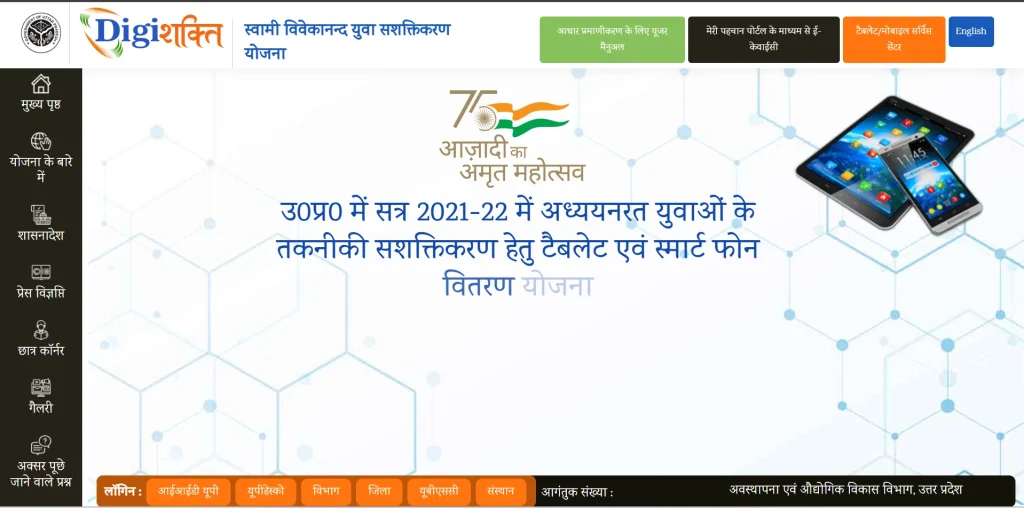
1. Visit the Official Platform
Students need to access the official platform (https://digishakti.up.gov.in/) where the Digishakti KYC process is available.
2. Enter Student Details
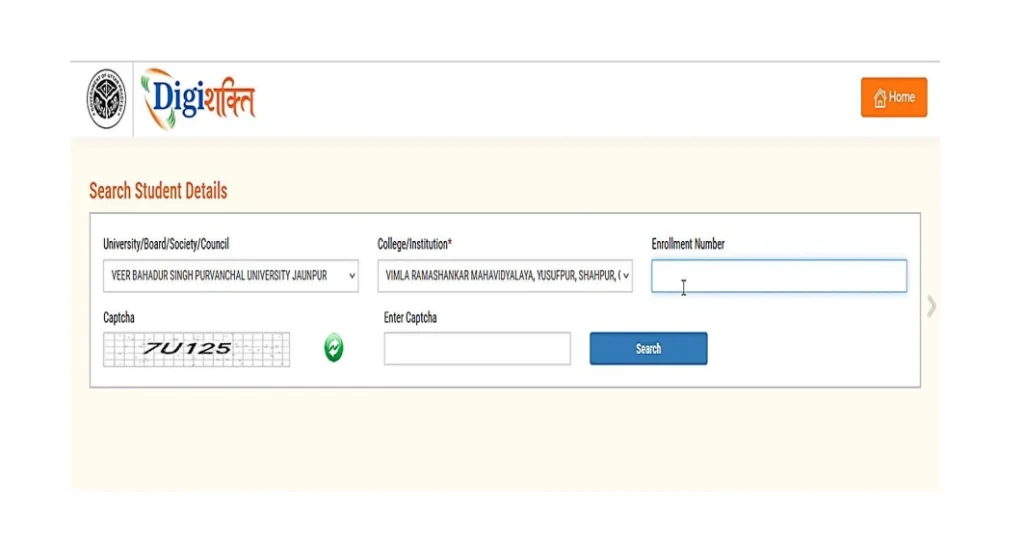
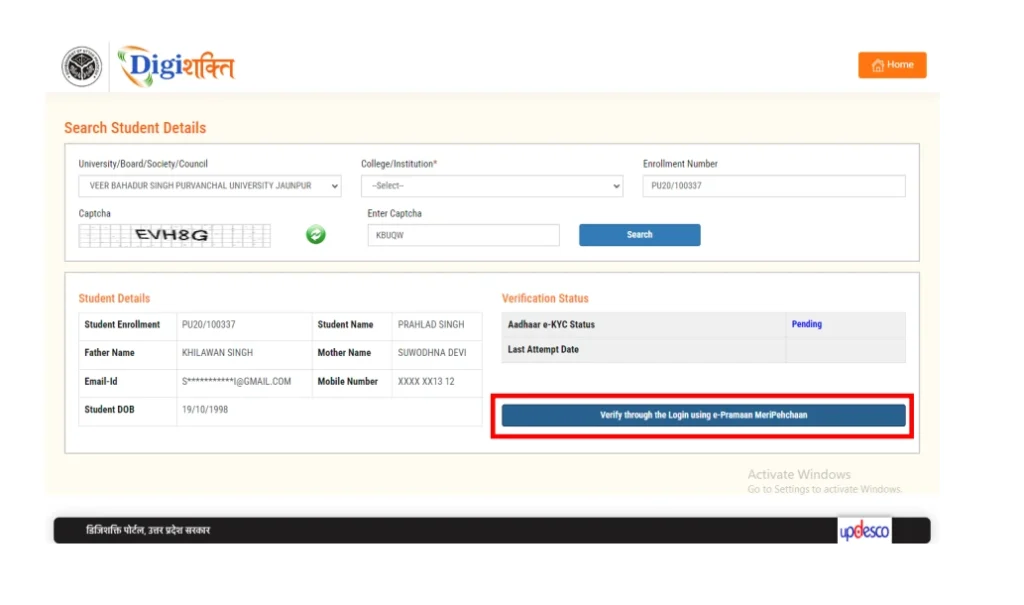
Provide the required information, such as enrollment number, registered mobile number, or other identification details.
3. Verify Identity
The system verifies the student’s identity using available records linked to their institution or government database.
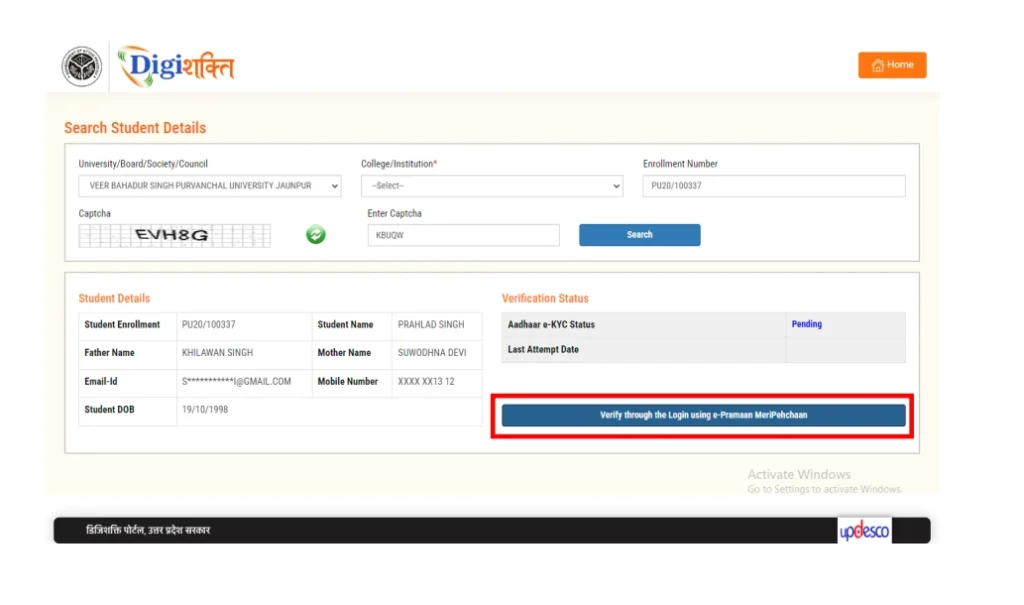
4. MeriPehchaan Sign-Up/Sign-In
You will be redirected to the MeriPehchaan portal for authentication.
- New users: Please select “New user? Sign up for MeriPehchaan.”
- Existing users: Please sign in using your MeriPehchaan credentials.
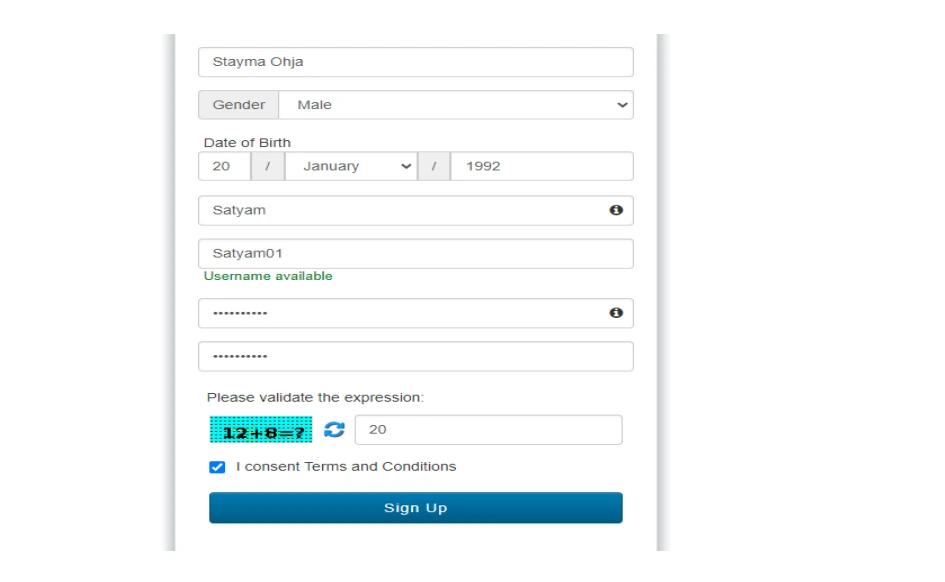
5. New User Registration(Create a New Account)
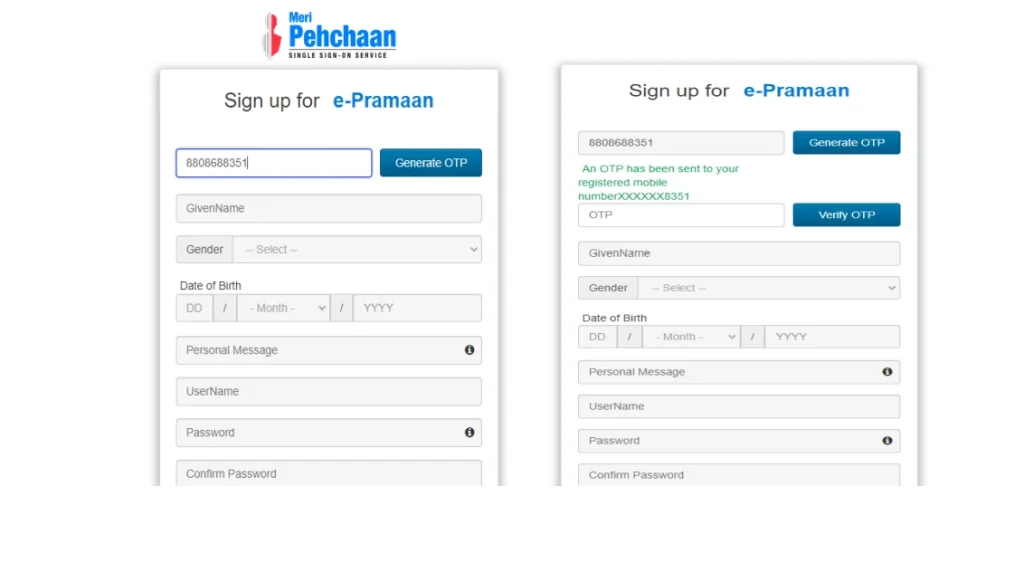
To register as a new MeriPehchaan user, please follow these steps:
- Enter your mobile number and complete OTP verification.
- Provide your personal details exactly as recorded on your Aadhaar card:
- Full Name
- Date of Birth
- Gender
- Create a secure username and password.
- Accept the Terms and Conditions to proceed.
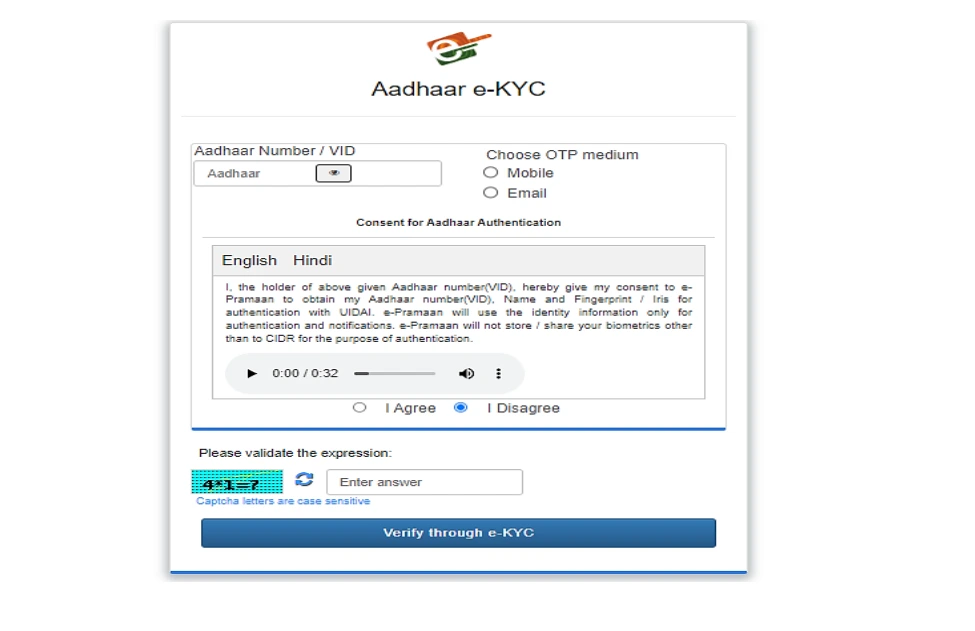
6. Aadhaar e-KYC Verification
Steps for Aadhaar e-KYC
- Provide your 12-digit Aadhaar number.
- Choose how you want to receive the OTP (mobile or email linked to Aadhaar).
- Click the “Verify through e-KYC” button.
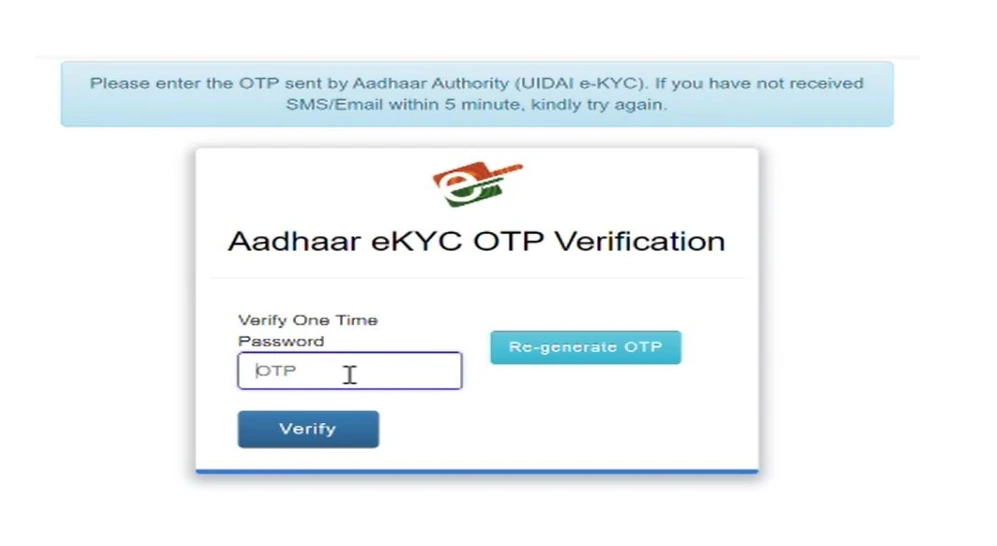
- Enter the OTP sent to your registered contact.
- The system will verify your details with UIDAI.
Enter the OTP sent to your mobile number.
7. Submit and Confirm
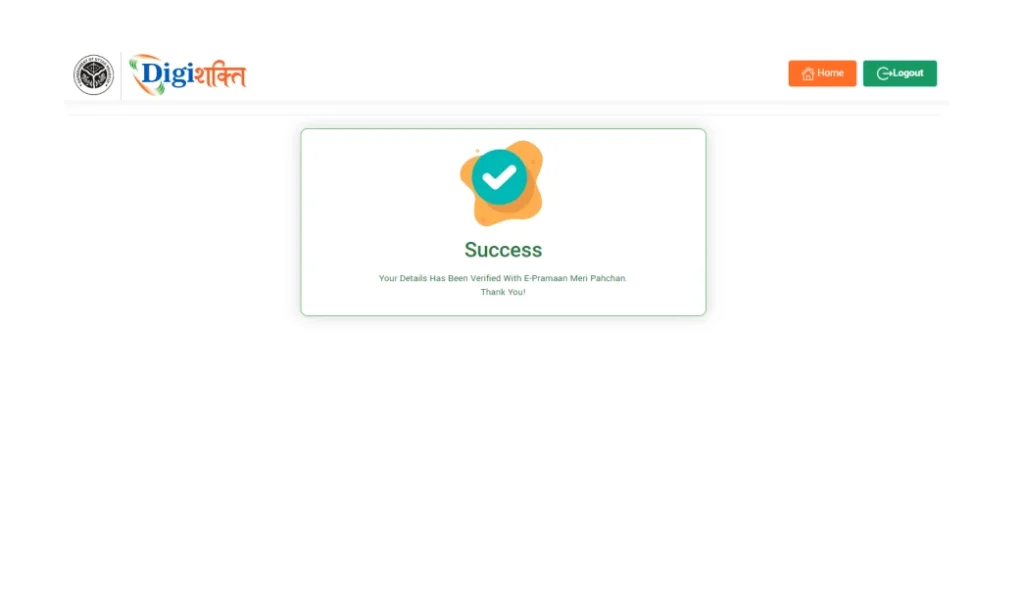
After successful verification:
- A confirmation message will appear on the MeriPehchaan portal.
- You will be redirected back to the portal.
- Your details will be automatically shared with the system.
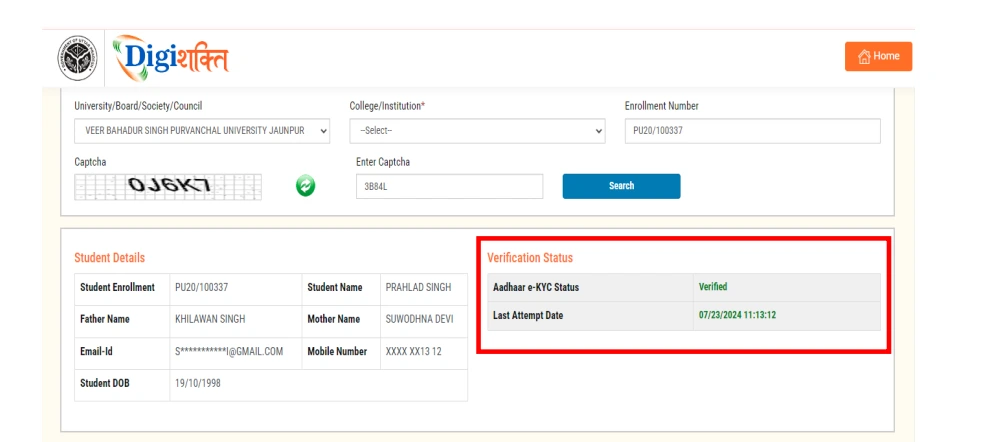
8. Check Your Verification Status
Once your DigiShakti eKYC is completed:
- Your status will update to “Verified” on the portal (if successful).
- Your details will be shared with the concerned institution and district nodal officers.
- The verification will go through institution, university, and department approvals.
- After final approval, you will be eligible to receive the device.
Basic Requirements for e-KYC Verification
Students generally need the following information to complete the eKYC process:
- Valid Aadhaar number for identity verification
- Student enrollment or registration number
- Mobile number linked with Aadhaar or registered with the institution
- Correct personal details in the college or university records
- Access to the official platform
- A stable internet connection for completing the online verification
Common Issues During the eKYC
While the system is designed to be simple, some students may face minor issues during the verification process.
These may include:
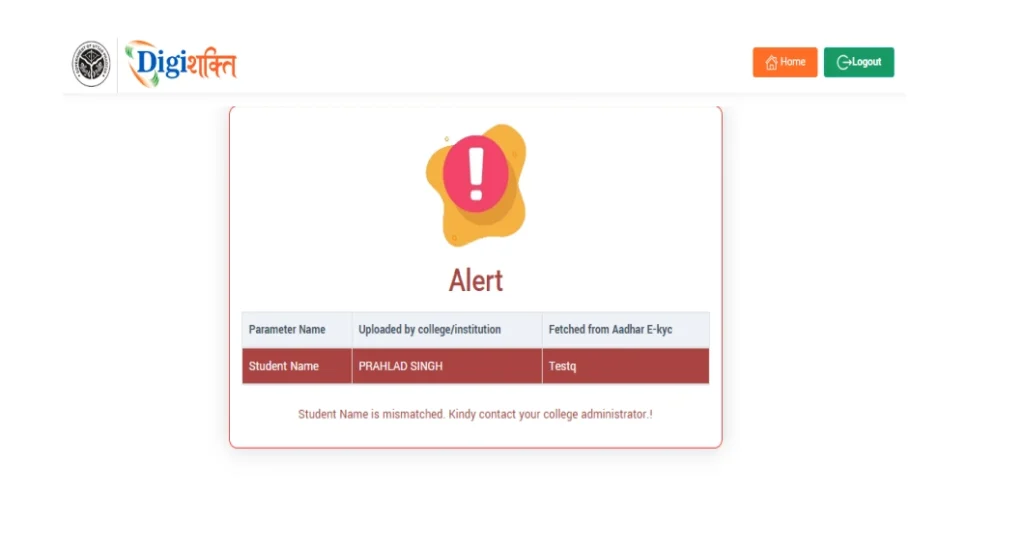
- Incorrect student details in the database
- Mobile number mismatch
- Temporary server or portal issues
- Delay in data updates from institutions
For example:-
Why DigiShakti eKYC is Important?
Completing the UP DigiShakti eKYC ensures that student information remains accurate and up to date. This is important because many government programs depend on verified records to deliver benefits.
Some key advantages of the system include:
- Secure student identity verification
- Faster access to digital services
- Reduced paperwork for institutions
- Transparent distribution of government resources
- Improved record management for education authorities
You can check your application status anytime by logging into the UP DigiShakti Portal. For detailed guidance, visit our Status Check page.
Simple Steps for a Smooth Verification
To avoid issues while completing UP DigiShakti eKYC, students should keep a few things in mind:
- Ensure their academic records are updated with their institution
- Use the correct registered mobile number
- Complete the process on the official platform only
- Check the verification status regularly
Following these steps can help students complete their verification without delays.
Understanding the Verification System
The UP DigiShakti eKYC process plays an important role in the digital transformation of student services in Uttar Pradesh. By enabling secure online verification, the system helps ensure that government-supported educational initiatives reach the right beneficiaries efficiently.
As digital education programs continue to expand, such systems help simplify administration and improve access to technology for students across the state.
Frequently Asked Questions (FAQs)
What is UP DigiShakti eKYC?
UP DigiShakti eKYC is an online verification process used to confirm student identity for accessing services and benefits under the digital education program in Uttar Pradesh.
How can students complete eKYC online?
Students can complete the KYC online process by visiting the DigiShakti portal, entering their student details, verifying their identity, and submitting the verification form.
What should I do if my verification fails?
If verification fails, students should check their personal details and contact their college administration to correct records before attempting the process again.
How can I check my eKYC status?
Students can check their verification status by logging into the portal using their enrollment details. The dashboard usually displays whether the e-KYC process is pending, verified, or requires correction.
Is Aadhaar mandatory for the eKYC?
Yes, Aadhaar is generally required for completing the eKYC process because it helps verify the student’s identity digitally. The details entered must match the information in the Aadhaar records.