
Many students in Uttar Pradesh benefit from government digital initiatives, and tracking application progress has become easier than ever. If you have applied under the scheme, the DigiShakti Status Check process helps you stay informed about approval, verification, and device distribution updates.
Through the official system, students can monitor their applications without visiting colleges or offices repeatedly. This guide explains how to complete your status check online, what details are required, and what to do if your name does not appear in the records.
Important Notice: For accurate status updates, visit the official DigiShakti portal (https://digishakti.up.gov.in/). Keep your enrollment number ready.
DigiShakti Status Check: Step-by-Step Process
The DigiShakti Status Check process is straightforward and requires only basic academic details. Before checking, ensure that your enrollment number and institutional information are correct.
Follow these steps carefully:
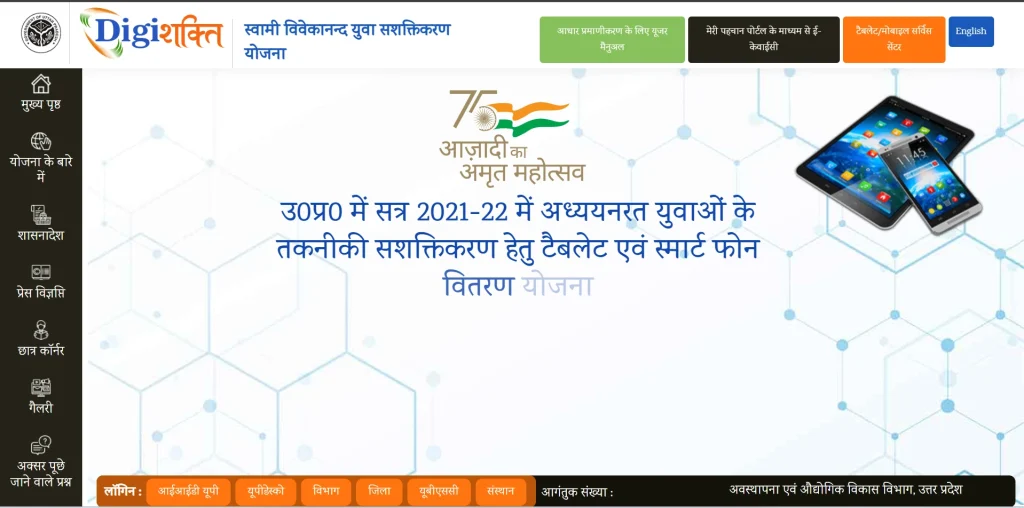
Step 1: Visit the official Status Page
Open the official portal’s website: https://digishakti.up.gov.in/
Step 2: Provide Your Details
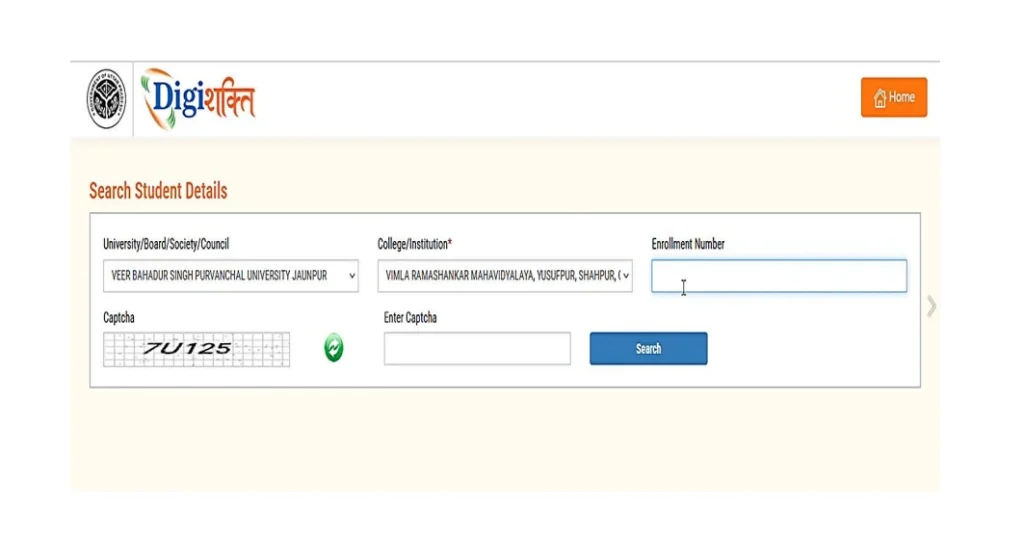
- To check your status, enter the required information:
- Choose your University/Board/Society/Council from the dropdown menu.
- Select your College/Institution from the dropdown menu.
- Enter your enrollment number accurately.
- Type the captcha code displayed on the screen.
- Click the “Search” button to proceed.
Step 3: View Application Status
After entering and submitting your information, the portal will display your current application status.
Different DigiShakti status check examples:
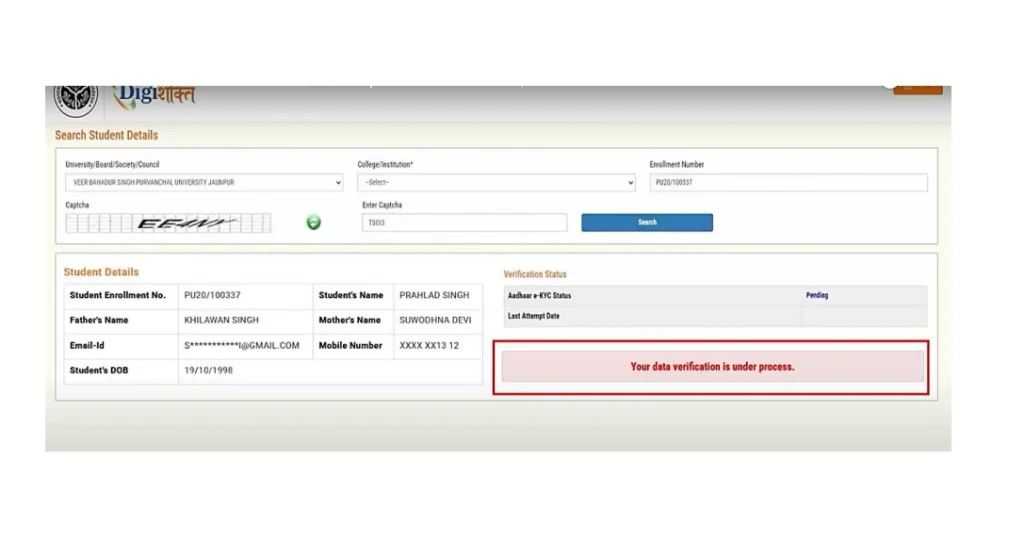
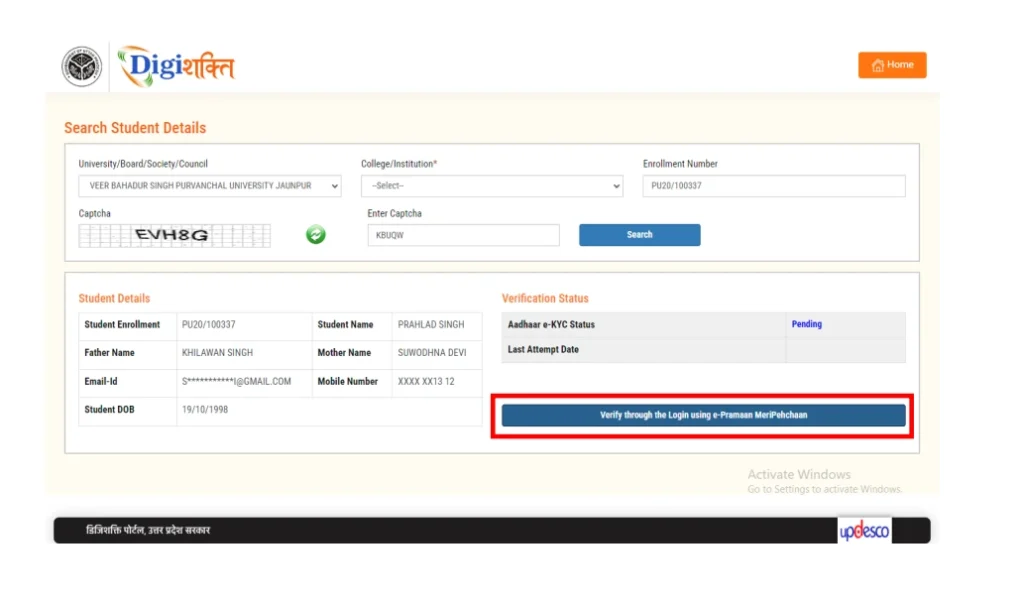
1. Pending / Under Review
- Your application has been received and is waiting for verification.
- e-KYC or document approval is still in process.
2. Failed / Not Verified
- Your application could not be verified due to missing or incorrect information.
- You may need to resubmit documents or correct errors.
3. Verified / Approved
- Your student details and documents have been successfully verified.
- You are eligible for tablet/smartphone distribution.
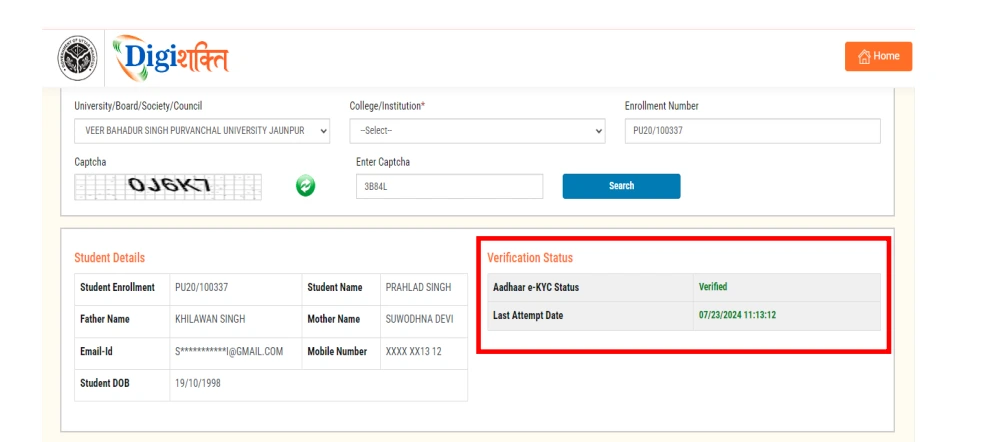
Once submitted, the system will display your current status along with relevant updates about verification or device distribution.
The official https://digishakti.up.gov.in page allows students to verify their information securely. Always ensure you are accessing the correct government website to avoid misinformation.
Common DigiShakti Status Messages Explained
When performing a DigiShakti Status Check, you may see different types of status updates. Understanding them helps reduce confusion.
Here are common status types:
- Pending Verification – Your institution has submitted data, but verification is ongoing.
- Approved – Your details have been verified and accepted.
- Rejected – There may be discrepancies in academic or personal data.
- Device Distributed – The smartphone or tablet has been issued.
If your status remains pending for a long time, follow up with your institution. In most cases, delays are due to verification backlogs.
How to Resolve “Failed” Status?
If your status shows “Failed”, follow these steps:
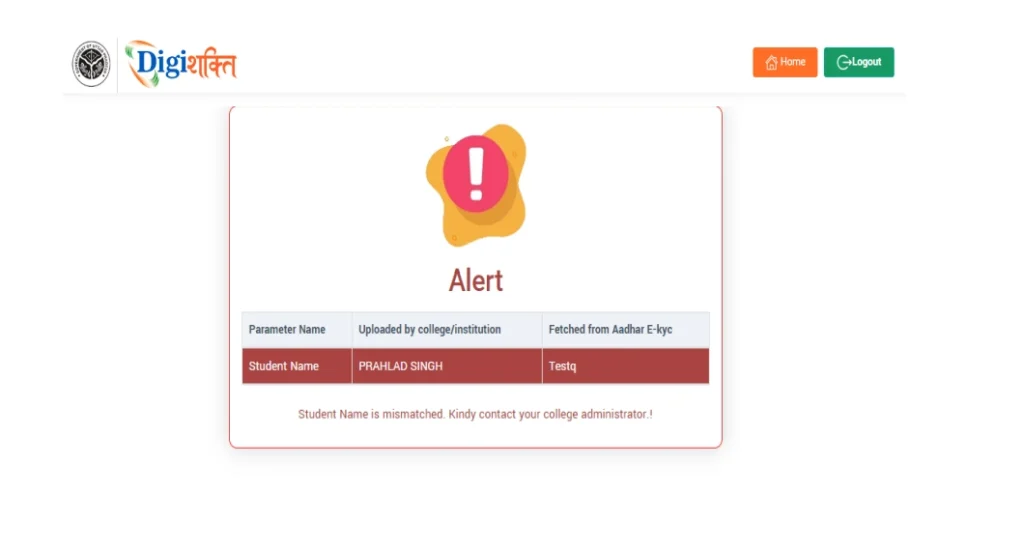
- Find out which data is incorrect or mismatched.
- Reach out to your institution’s Nodal Officer with the correct details.
- Ask the officer to update your information in the portal.
- Allow the system to re-verify your updated data.
- Log in after a few days to confirm that the issue is resolved.
DigiShakti Status Check & Processing Timeline
Understanding the DigiShakti Status Check timeline helps students track progress from data submission to device distribution. Below is a clear and structured table showing each stage, expected time frame, and what happens during that phase.
| Stage No. | Process Stage | Expected Time Frame | Expected Time Frame | Possible Status Shown |
| 1 | Possible Status Shown | 3–10 Days | College uploads student details (Enrollment, Aadhaar, Course data) to the portal. | — |
| 2 | e-KYC Verification | 7–15 Days | Aadhaar details are matched with institutional records for identity validation. | Pending / Verified / Failed |
| 3 | University / Department Review | 10–20 Days | Authorities verify eligibility, course enrollment, and student authenticity. | Under Process |
| 4 | University / Department Review | 5–10 Days | The application is officially approved for device distribution. | Approved |
| 5 | Device Allocation | 7–14 Days | A tablet or smartphone is assigned to the student. | Device Allocated |
| 6 | Device Distribution | Varies by District | The institution distributes the device and updates system records. | Device Delivered |
DigiShakti UP App and Portal Access
Students often search for the app to track updates more conveniently. While most services are accessible through the web platform, the official UP system ensures centralised tracking and transparency.
Whether you use a mobile device or a desktop, make sure:
- You access the official website only.
- Your personal details match college records.
- You keep your registration number handy.
- You check updates regularly during distribution phases.
The system relies heavily on institutional accuracy, so students should confirm that their academic records are correctly uploaded.
What to Do If Your Name Is Missing?
If your name does not appear during the DigiShakti Status Check, do not panic. In most cases, the issue is related to incomplete institutional data submission.
Follow these steps:
- Contact your college administration office.
- Verify whether your enrollment data was submitted.
- Confirm your Aadhaar and academic details.
- Request correction if any information is incorrect.
Avoid relying on unofficial sources for updates. Only the official platform reflects accurate and updated beneficiary information.
Stay Updated with Official Information
Regularly performing a DigiShakti Status Check helps students stay informed and prepared for device distribution. The process is straightforward, transparent, and designed to reduce unnecessary visits to institutions.
By keeping your academic details accurate and monitoring the official portal, you can ensure that you receive updates without confusion or delay.
Frequently Asked Questions (FAQs)
How can I complete the DigiShakti Status Check online?
Visit the official portal, enter your registration or enrollment details, and submit the form to view your current application status instantly.
What should I do if my DigiShakti application is rejected?
Contact your institution to verify your academic and personal details. Most rejections happen due to incorrect or incomplete data submissions.
Where can I find the Digishakti portal student list?
You can access the student list through the official portal by logging in with your enrollment details and checking your approval status.